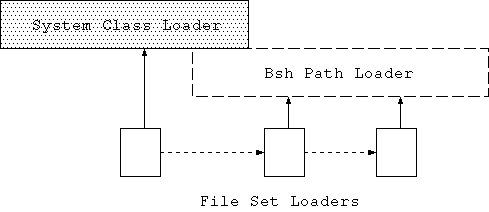
|
To install as an extension place the bsh.jar file in your $JAVA_HOME/jre/lib/ext folder. (OSX users: place the bsh.jar in /Library/Java/Extensions or ~/Library/Java/Extensions for individual users.) Or add BeanShell to your classpath like this: unix: export CLASSPATH=$CLASSPATH:bsh-xx.jar windows: set classpath %classpath%;bsh-xx.jar |
| Tip: You can modify the classpath from within BeanShell using the addClassPath() and setClassPath() commands. |
    java bsh.Console       // run the graphical desktop
or
    java bsh.Interpreter   // run as text-only on the command line
or
    java bsh.Interpreter filename [ args ] // run script file
|
foo = "Foo";
four = (2 + 2)*2/2;
print( foo + " = " + four );  // print() is a BeanShell command

// Do a loop
for (i=0; i<5; i++)
    print(i);

// Pop up a frame with a button in it
button = new JButton( "My Button" );
frame = new JFrame( "My Frame" );
frame.getContentPane().add( button, "Center" );
frame.pack();
frame.setVisible(true);
|
| Tip: BeanShell commands are not really "built-in" but are simply BeanShell scripts that are automatically loaded from the classpath. You can add your own scripts to the classpath to extend the basic command set. |
int addTwoNumbers( int a, int b ) {
    return a + b;
}

sum = addTwoNumbers( 5, 7 );  // 12
|
add( a, b ) {
    return a + b;
}

foo = add(1, 2);            // 3
foo = add("Oh", " baby");   // "Oh baby"
|
ActionListener scriptedListener = new ActionListener() {
    actionPerformed( event ) { ... }
}
|
ml = new MouseListener() {
    mousePressed( event ) { ... }
    // handle the rest
    invoke( name, args ) { print("Method: "+name+" invoked!");
}
|
foo() {
    print("foo");
    x=5;

    bar() {
        print("bar");
    }

    return this;
}

myfoo = foo();    // prints "foo"
print( myfoo.x ); // prints "5"
myfoo.bar();      // prints "bar"
|
import bsh.Interpreter;

Interpreter i = new Interpreter();  // Construct an interpreter
i.set("foo", 5);                    // Set variables
i.set("date", new Date() );

Date date = (Date)i.get("date");    // retrieve a variable

// Eval a statement and get the result
i.eval("bar = foo*10");
System.out.println( i.get("bar") );

// Source an external script file
i.source("somefile.bsh");
|
| Tip: In the above example the Interpreter's eval() method also returned the value of bar as the result of the evaluation. |
/*
    Standard Java syntax
*/

// Use a hashtable
Hashtable hashtable = new Hashtable();
Date date = new Date();
hashtable.put( "today", date );

// Print the current clock value
print( System.currentTimeMillis() );

// Loop
for (int i=0; i<5; i++)
    print(i);

// Pop up a frame with a button in it
JButton button = new JButton( "My Button" );
JFrame frame = new JFrame( "My Frame" );
frame.getContentPane().add( button, "Center" );
frame.pack();
frame.setVisible(true);
|
/*
    Loosely Typed Java syntax
*/

// Use a hashtable
hashtable = new Hashtable();
date = new Date();
hashtable.put( "today", date );

// Print the current clock value
print( System.currentTimeMillis() );

// Loop
for (i=0; i<5; i++)
    print(i);

// Pop up a frame with a button in it
button = new JButton( "My Button" );
frame = new JFrame( "My Frame" );
frame.getContentPane().add( button, "Center" );
frame.pack();
frame.setVisible(true);
|
try {
    int i = 1/0;
} catch ( ArithmeticException e ) {
    print( e );
}
|
try {
    ...
} catch ( e ) {
    print( "caught exception: "+e );
}
|
| Note: As of BeanShell version 1.3 the default scoping of loosely typed variables was changed to be more consistent with Java. BeanShell still supports an alternate scoping used in earlier versions. This mode can be enabled for legacy code by setting the system property "localscoping" to true. See appendix "Local Scoping". |
// Arbitrary code block
{
    y = 2;      // Untyped variable assigned
    int x = 1;  // Typed variable assigned
}
print( y ); // 2
print( x ); // Error! x is undefined.

// Same with any block statement: if, while, try/catch, etc.
if ( true ) {
    y = 2;      // Untyped variable assigned
    int x = 1;  // Typed variable assigned
}
print( y ); // 2
print( x ); // Error! x is undefined.
|
for( int i=0; i<10; i++ ) {  // typed for-init variable
    j=42;
}
print( i ); // Error! 'i' is undefined.
print( j ); // 42

for( z=0; z<10; z++ ) { }   // untyped for-init variable
print( z ); // 10
|
button = new java.awt.Button();
button.label = "my button";  // Equivalent to: b.setLabel("my button");
print( button.label );       // Equivalent to print( b.getLabel() );
|
Float f = new Float(42f); print( f.infinite ); // Equivalent to print( f.isInfinite() ); // false |
b = new java.awt.Button();
b{"label"} = "my button";  // Equivalent to: b.setLabel("my button");

h = new Hashtable();
h{"foo"} = "bar";          // Equivalent to: h.put("foo", "bar");
|
List foo = getSomeList();

for ( untypedElement : foo )
	print( untypedElement );

for ( Object typedElement: foo )
	print( typedElement );

int [] array = new int [] { 1, 2, 3 };

for( i : array )
	print(i);

for( char c : "a string" )
	print( c );
|
dateobj = new Date();

switch( dateobj )
{
	case newYears:
		break;
	case christmas:
		break;
	default:
}
|
int i=5; Integer iw = new Integer(5); print( i * iw ); // 25 Vector v = new Vector(); v.put(1); int x = v.getFirstElement(); |
// Standard Java import javax.xml.parsers.*; import mypackage.MyClass; |
import *; |
| Tip: The BeanShell which() command will use the classpath mapping capability to tell you where exactly in your classpath a specified class is located: bsh % which( java.lang.String ); Jar: file:/usr/java/j2sdk1.4.0/jre/lib/rt.jar |
importCommands("/bsh/commands");
|
| Tip: The classes java.awt.List and java.util.List are both imported by default. Because java.util.List is imported later, as part of the java.util package, it takes precedence. To access java.awt.List simply import it in, or the java.awt package again your script. Later imports take precedence. |
| @gt | > |
| @lt | < |
| @lteq | <= |
| @gteq | >= |
| @or | || |
| @and | && |
| @bitwise_and | & |
| @bitwise_or | | |
| @left_shift | << |
| @right_shift | >> |
| @right_unsigned_shift | >>> |
| @and_assign | &= |
| @or_assign | |= |
| @left_shift_assign | <<= |
| @right_shift_assign | >>= |
| @right_unsigned_shift_assign | >>>= |
int addTwoNumbers( int a, int b ) {
    return a + b;
}
|
sum = addTwoNumbers( 5, 7 ); |
add( a, b ) {
    return a + b;
}
|
foo = add(1, 2);
print( foo ); // 3

foo = add("Oh", " baby");
print( foo ); // Oh baby
|
// foo() and bar() are synchronized as if they were in a common class
synchronized foo() { }
synchronized bar() { }
|
a = 1;
anotherMethod() { ... }

foo() {
    print( a );
	a = a+1;
	anotherMethod();
}

// invoke foo()
foo();      // prints 1
print( a ); // prints 2
|
a = 1;

foo() {
	a = a + 1; // a is defined in parent scope
	b = 3;     // undefined, defaults local scope
	int c = 4; // declared local scope
}

// invoke foo()
print( a ); // prints 2
print( b ); // ERROR! b undefined
print( c ); // ERROR! c undefined
|
foo() {
	var a = 1;
}
foo();
print( a ); // ERROR! a is undefined!
|
foo() {
	this.a = 1;
}
foo();
print( a ); // ERROR! a is undefined!
|
int a = 42;

foo() {
    int a = 97;
    print( a );
    print( super.a );
}

foo();  // prints 97, 42
|
| Note: In standard Java, a method inside of an object (an instance method) may refer to the enclosing object using the special variable 'this'. For example:
    // MyClass.java
    MyClass {
        Object getObject() {
            return this; // return a reference to our object
        }
    }
In the example above, the getObject() method of MyClass returns a reference
to its own object instance (an instance of the MyClass object) using 'this'.
|
// Define the foo() method:
foo() {
    int bar = 42;
    print( bar );
}

// Invoke the foo() method:
foo();  // prints 42

print( bar ); // Error, bar is undefined here
|
foo() {
    int bar = 42;
    return this;
}

fooObject = foo();
print( fooObject.bar ); // prints 42!
|
foo() {
    bar() {
        ...
    }
}
|
foo() {
    int a = 42;
    bar() {
        print("The bar is open!");
    }

    bar();
    return this;
}

// Construct the foo object
fooObject = foo();     // prints "the bar is open!"
// Print a variable of the foo object
print ( fooObject.a )  // 42
// Invoke a method on the foo object
fooObject.bar();       // prints "the bar is open!"
|
foo() {

	bar() { }

	if ( true ) {
		bar2() { }
	}

	return this;
}
|
| Note: If you print a 'this' type reference you'll see what it refers to:
    BeanShell 1.3 - by Pat Niemeyer (pat@pat.net)
    bsh % print( this );
    'this' reference (XThis) to Bsh object: global
    bsh % foo() { print(this); print(super); }
    bsh % foo();
    'this' reference (XThis) to Bsh object: foo
    'this' reference (XThis) to Bsh object: global
|
global.foo = 42; |
// Create a top level object to hold some state
dataholder = object();

foo() {
    ...
    bar() {
        dataholder.value = 42;
    }

    bar();
    print( dataholder.value );
}
|
| Tip: In the above example we used the BeanShell object() command to create an "empty" BeanShell scripted object context in which to hold some data. The object() command is just a standard empty method named object() that returns 'this'. The variable 'dataholder' above is a 'this' type reference and has all of the properties of any other BeanShell object scope. |
print( this ); // 'this' reference (XThis) to Bsh object: global

// The following cases all synchronize on the same lock
synchronized ( this ) { }     // synchronized block
synchronized int foo () { }   // synchronized method foo()
synchronized int bar () { }   // synchronized method bar()
int gee() {
	synchronized( super ) { }  // synchronized blockinside gee()
}
|
buttonHandler = new ActionListener() {
    actionPerformed( event ) {
        print(event);
    }
};

button = new JButton();
button.addActionListener( buttonHandler );
frame(button);
|
ActionListener interface and assigned it to a variable called
buttonHandler.
The buttonHandler object contains the scripted method actionPerformed(),
which will be called to handle invocations of that method on the interface.
Note that in the example we registered our scripted ActionListener with a
JButton using its addActionListener() method. The JButton is, of course,
a standard Swing component written in Java. It has no knowledge that when it
invokes the buttonHandler's actionPerformed() method it will actually be
causing the BeanShell interpreter to run a script to evaluate the outcome.
To generalize beyond this example a bit - Scripted interfaces work by looking
for scripted methods to implement the methods of the interface.
A Java method invocation on a script that implements an interface causes
BeanShell to look for a corresponding scripted method with
a matching signature (name and argument types). BeanShell then invokes the
method, passing along the arguments and passing back any return value.
When BeanShell runs in the same Java VM as the rest of the code, you can
freely pass "live" Java objects as arguments and return values, working
with them dynamically in your scripts; the integration can be seamless.
See also the dragText example.
actionPerformed( event ) {
    print( event );
}

button = new JButton("Foo!");
button.addActionListener( this );
frame( button );
|
ActionEvents are fired by the button, your
actionPerformed() method will be invoked. The BeanShell 'this' reference
to our script implements the interface and directs method invocations to the
appropriately named method, if it exists.
| Note: If you want to have some fun, try entering the previous example interactively in a shell or on the command line. You'll see that you can then redefine actionPerformed() as often as you like by simply entering the method again. Each button press will find the current version in your shell. In a sense, you are working inside a dynamic Java object that you are creating and modifying as you type. Neat, huh? Be the Bean! |
messageButton( message ) {
    JButton button = new JButton("Press Me");
    button.addActionListener( this );
    JFrame frame = frame( button );

    actionPerformed( e ) {
        print( message );
        frame.setVisible(false);
    }
}

messageButton("Hey you!");
messageButton("Another message...");
|
actionPerformed( event ) {
    print( event );
}

button.addActionListener(
    (ActionListener)this ); // added cast
|
mouseHandler = new MouseListener() {
    mousePressed( event ) {
        print("mouse button pressed");
    }

    invoke( method, args ) {
        print("Undefined method of MouseListener interface invoked:"
            + name +", with args: "+args
        );
    }
};
|
import javax.xml.parsers.*;
import org.xml.sax.InputSource;

factory = SAXParserFactory.newInstance();
saxParser = factory.newSAXParser();
parser = saxParser.getXMLReader();
parser.setContentHandler( this );

invoke( name, args ) {
    print( name );
}

parser.parse( new InputSource(bsh.args[0]) );
|
| Tip: You can use the invoke( name, args ) meta-method directly in your own scope or in the global scope as well, in which case you can handle arbitrary "unknown" method invocations yourself, perhaps to implement your own "virtual" commands. Try typing this on the command line:
  invoke(name,args) { print("Command: "+name+" invoked!"); }
  noSuchMethod(); // prints "Command: noSuchMethod() invoked!"
|
foo() {
    run() {
        // do work...
    }
    return this;
}

foo = foo();
// Start two threads on foo.run()
new Thread( foo ).start();
new Thread( foo ).start();
|
| Note: You can use the bg() "background" command to run an external script in a separate thread. See bg(). |
| Note: The choice of "bsh" for the root system object name was somewhat unfortunate because it conflicts with the current package name for BeanShell (also bsh). This means that if you wish to work with BeanShell classes explicitly from BeanShell scripts (e.g. bsh.Interpreter) you must first import them, e.g.:
    import bsh.Interpreter;
    i=new Interpreter();
|
if ( foobar == void )
    // undefined
|
a == void;  // true
a=5;
unset("a"); // note the quotes
a == void;  // true
|
getBshPrompt() { return bsh.cwd + " % "; }
|
| Tip: You can easily override any BeanShell command simply by defining the method yourself in your script. For example:
print( arg ) {
    System.out.println( "You printed: " + arg );
}
If you define the method in the global scope it will apply everywhere. If you
define it local to a scripted object it will only apply in that object context.
|
| exit() | Exit the interpreter. (Also Control-D). |
| show() | Turn on "show" mode which prints the result of every evaluation that is not of void type. |
| setAccessibility() | Turn on access to private and protected members of Java classes. |
| server() | Launch the remote access mode, allowing remote access to the interpreter from a web browser or telnet client. |
| debug() | Turns on debug mode. Note: this is very verbose, unstructured output and is primarily of interest to developers. |
| setStrictJava() | Turn on "strict Java" mode which enforces Java compatibility by dissallowing loose types and undeclared variables. |
| print(), error() | Print output to standard out or standard error. print() always goes to the console, whereas System.out may or may not be captured by a GUI console or servlet. |
| frame() | Display the AWT or Swing component in a Frame |
| eval() | Evaluate a string as if it were typed in the current scope. |
| source(), sourceRelative() | Read an external script file into the interpreter and evaluate it in the current scope |
| run(), bg() | Run an external file in a subordinate interpreter or in a background thread in a subordinate interpreter. |
| exec() | Run a native executable in the host OS |
| javap() | Print the methods and fields of an object, similar to the output of javap |
| which() | Like the Unix 'which' command for executables. Map the classpath and determine the location of the specified class. |
| load(), save() | load a serializable object from a file or save one to a file. Special handling is provided for certain objects. |
| object() | Create an "empty" object context to hold variables; analogous to a Map. |
| clear() | Clear all variables, methods and imports from the current scope. |
| unset() | Remove a variable from the current scope. (Return it to the "undefined" state). |
| setNameSpace() | Set the current namespace to a specified scope. Effectively bind the current scope to a new parent scope. |
| addClassPath(), setClassPath(), getClassPath() | Modify the BeanShell classpath. |
| reloadClasses() | Reload a class or group of classes. |
| getClass() | Load a class explicitly taking into account the BeanShell classpath. |
| getResource() | Get a resource from the classpath. |
| cd(), pwd(), dir(), rm(), mv(), cat() | Unix Style file commands. |
| pathToFile() | Translate a relative path to an absolute path taking into account the BeanShell current working directory. |
| classBrowser(), browseClass() | Open a class browser window or browse a specific class or object. |
| desktop() | Launch the BeanShell GUI desktop. |
| setNameCompletion() | Turn on or off name completion in the GUI console. |
| Note: The dir() command is written in Java; primarily as a demonstration of how to do this when desired. |
// File: helloWorld.bsh
helloWorld() {
    print("Hello World!");
}
|
addClassPath("/home/pat");  // If it's not already in our classpath
importCommands("/mycommands");
|
helloWorld(); // prints "Hello World!" |
// equivalent
importCommands("com.xyz.utils");
importCommands("/com/xyz/utils");
|
// File: helloWorld.bsh
helloWorld() {
	print("Hello World!");
}
helloWorld( String msg ) {
	print("Hello World: "+msg);
}
|
/**
	Implement dir() command.
*/
public static void invoke( Interpreter env, CallStack callstack )
{
	String dir = ".";
	invoke( env, callstack, dir );
}

/**
	Implement dir( String directory ) command.
*/
public static void invoke(
	Interpreter env, CallStack callstack, String dir )
{
...
}
|
invoke( String methodName, Object [] arguments ) {
	print("You invoked the method: "+ methodName );
}

// invoke() will be called to handle noSuchMethod()
noSuchMethod("foo");
|
| Note: Note that this means that currently scripted commands may only be loaded once and then they are effectively cached. |
fooSetter() {
    this.caller.foo=42;
}
|
fooSetter(); print( foo ); // 42 |
foo() { ... }
foo();
|
foo() {
    bar() { ... }
    ...
}

// somewhere
fooObject.bar();
|
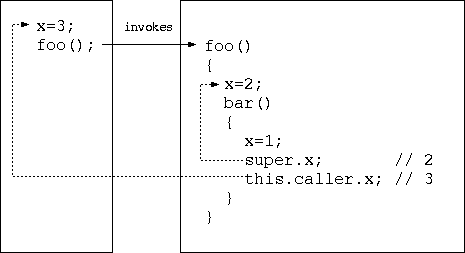 The diagram above shows the foo() and bar() scopes, along with the caller's
scope access via 'this.caller'.
This is very useful in writing BeanShell commands.
BeanShell command methods are always loaded into the global
scope. If you refer to 'super' from your command you will simply
get 'global'. Often it is desirable to write commands that explicitly have
side effects in the caller's scope. The ability to do so makes it possible to
write new kinds of commands that have the appearance of being "built-in"
to the language.
A good example of this is the eval() BeanShell command. eval() evaluates
a string as if it were typed in the current context. To do this, it sends
the string to an instance of the BeanShell interpreter. But when it does
so it tells the interpreter to evaluate the string in a specific namespace:
the namespace of the caller; using this.caller.
The diagram above shows the foo() and bar() scopes, along with the caller's
scope access via 'this.caller'.
This is very useful in writing BeanShell commands.
BeanShell command methods are always loaded into the global
scope. If you refer to 'super' from your command you will simply
get 'global'. Often it is desirable to write commands that explicitly have
side effects in the caller's scope. The ability to do so makes it possible to
write new kinds of commands that have the appearance of being "built-in"
to the language.
A good example of this is the eval() BeanShell command. eval() evaluates
a string as if it were typed in the current context. To do this, it sends
the string to an instance of the BeanShell interpreter. But when it does
so it tells the interpreter to evaluate the string in a specific namespace:
the namespace of the caller; using this.caller.
    eval("a=5");
    print( a ); // 5
|
eval( String text ) {
	this.interpreter.eval( text, this.caller.namespace );
}
|
this.caller.caller...;
|
myCommand() {
	// "Step into" the caller's namespace.
	setNameSpace( this.caller.namespace );

	// work as if we were in the caller's namespace.
}
|
object = object(); // save our namespace savedNameSpace = this.namespace; // step into object's namespace setNameSpace( object.namespace ); // Work in the object's scope a=1; b=2; // step back setNameSpace( savedNameSpace ); print( object.a ); // 1 print( object.b ); // 2 print( a ); // ERROR! undefined |
assert( boolean condition )
{
    if ( condition )
        print( "Test Passed..." );
    else {
        print(
            "Test FAILED: "
            +"Line: "+ this.namespace.getInvocationLine()
            +" : "+this.namespace.getInvocationText()
            +" : while evaluating file: "+getSourceFileInfo()
        );
        super.test_failed = true;
    }
}
|
absfilename = pathToFile( filename ); |
dir("c:/Windows"); // ok
dir("c:\\Windows"); // ok
|
javap( Date.class ); // use a class type directly javap( new Date() ); // uses class of object javap( "java.util.Date" ); // Uses string name of class javap( java.util.Date ); // Use plain class identifier |
	import bsh.ClassIdentifier;

    if ( o instanceof ClassIdentifier )
        clas = this.namespace.identifierToClass(o);
    if ( o instanceof String)
        clas = this.namespace.getClass((String)o);
    else if ( o instanceof Class )
        clas = o;
    else
        clas = o.getClass();
|
cm = CollectionManager.getCollectionManager();
if ( cm.isBshIterable( myObject ) )
{
	BshIterator iterator = cm.getBshIterator( myObject );
	while ( iterator.hasNext() )
		i = iterator.next();
}
|
setStrictJava(true);

int a = 5;

foo=42; // Error! Undeclared variable 'foo'.

bar() { .. } // Error! No declared return type.
|
addClassPath( "/home/pat/java/classes" );
addClassPath( "/home/pat/java/mystuff.jar" );
addClassPath( new URL("http://myserver/~pat/somebeans.jar") );
|
cd("/tmp");
addClassPath("."); // /tmp
|
import *; |
reloadClasses(); |
reloadClasses("mypackage.*");
|
reloadClasses(".*")
reloadClasses("<unpackaged>")
|
reloadClasses("mypackage.MyClass")
|
name="foo.bar.MyClass"; c = getClass( name ); c = BshClassManager.classForName( name ); // equivalent |

java bsh.Interpreter [ filename ] [ arg ] [ ... ] // Run a script file |
// servlet mode URL java bsh.Remote http://localhost/bshservlet/eval test1.bsh // remote server mode URL java bsh.Remote bsh://localhost:1234/ test1.bsh |
| Tip: The BeanShell GUI is comprised mostly of a set of BeanShell scripts supplied in the JAR file and launched by the BeanShell desktop() command. |
java bsh.Interpreter // Run interactively on the command line |
| Tip: You can exit from an interactive shell by typing Control-D. |
| Unix | $HOME/.bshrc |
| Win95/98 single user | C:\Windows\.bshrc |
| Win98 Multiuser | C:\Windows\Profiles\<username>\.bshrc |
| NT/2K | C:\Winnt\Profiles\<username>\.bshrc |
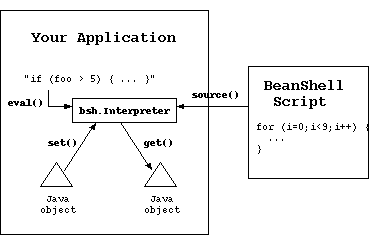
import bsh.Interpreter;

Interpreter i = new Interpreter();  // Construct an interpreter
i.set("foo", 5);                    // Set variables
i.set("date", new Date() );

Date date = (Date)i.get("date");    // retrieve a variable

// Eval a statement and get the result
i.eval("bar = foo*10");
System.out.println( i.get("bar") );

// Source an external script file
i.source("somefile.bsh");
|
| Note: It is not necessary to add a trailing ";" semi-colon at the end of the evaluated string. BeanShell always adds one at the end of the string. |
Object result = i.eval( "long time = 42; new Date( time )" ); // Date
Object result = i.eval("2*2");  // Integer
|
reader = new FileReader("myscript.bsh");
i.eval( reader );
|
try {
    i.eval( script );
} catch ( EvalError e ) {
    // Error evaluating script
}
|
| String getErrorText() { |
| int getErrorLineNumber() { |
| String getErrorSourceFile() { |
try {
    i.eval( script );
} catch ( TargetError e ) {
    // The script threw an exception
    Throwable t = e.getTarget();
    print( "Script threw exception: " + t );
} catch ( ParseException e ) {
    // Parsing error
} catch ( EvalError e ) {
    // General Error evaluating script
}
|
i.source("myfile.bsh");
|
import bsh.Interpreter;
i=new Interpreter();

i.eval("myobject=object()" );
i.set("myobject.bar", 5);

i.eval("ar=new int[5]");
i.set("ar[0]", 5);

i.get("ar[0]");
|
// script the method globally
i.eval( "actionPerformed( e ) { print( e ); }");

// Get a reference to the script object (implementing the interface)
ActionListener scriptedHandler =
    (ActionListener)i.eval("return (ActionListener)this");

// Use the scripted event handler normally...
new JButton.addActionListener( scriptedHandler );
|
Interpreter interpreter = new Interpreter();
// define a method called run()
interpreter.eval("run() { ... }");

// Fetch a reference to the interpreter as a Runnable
Runnable runnable =
    (Runnable)interpreter.getInterface( Runnable.class );
The interface generated is an adapter (as are all interpreted interfaces).
It does not interfere with other uses of the global scope or other
references to it.
We should note also that the interpreter does *not* require that any or all
of the methods of the interface be defined at the time the interface is
generated. However if you attempt to invoke one that is not defined
you will get a runtime exception.
| Tip: You can clear all variables, methods, and imports from a scope using the clear() command. |
| Note: There is serious Java bug that affects BeanShell serializability in Java versions prior to 1.3. When using these versions of Java the primitive type class identifiers cannot be de-serialized. See the FAQ for a workaround. |
// From BeanShell object.namespace.prune(); // From Java object.getNameSpace().prune(); |
// From BeanShell bind( object, this.namespace ); // From Java bsh.This.bind( object, namespace, interpreter ); |
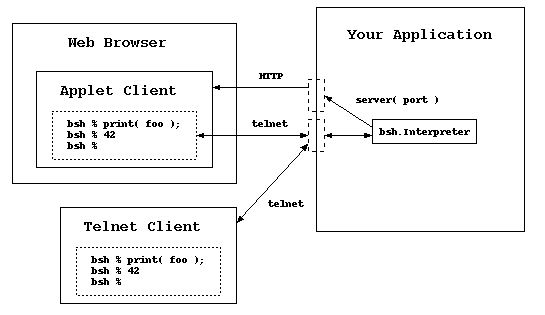
|
Warning:
When activated remote server mode can provide unrestricted access to all parts of your application and the host server. This mode should not be used in production environments or anywhere that server security is an issue. |
server(1234); // Httpd started on port: 1234 // Sessiond started on port: 1235 |
| http://<yourserver>:<port>/remote/jconsole.html | Swing based JConsole page |
| http://<yourserver>:<port>/remote/awtconsole.html | Minmal (old) AWT based Console page |
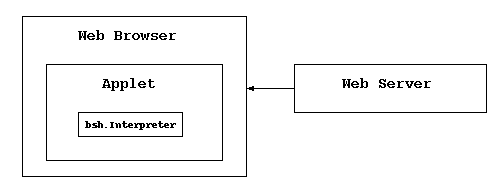
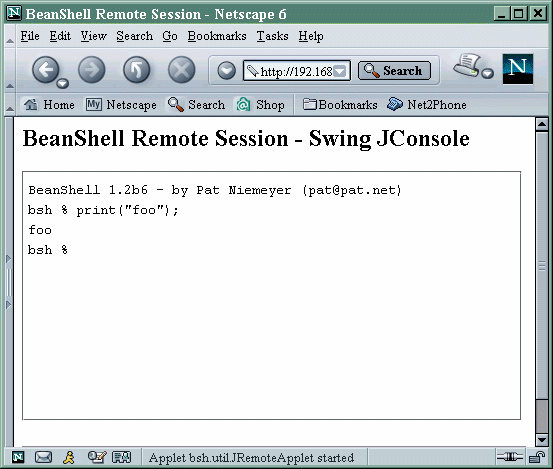 You can open as many sessions into that VM as you like in this way, but
note that unlike the BeanShell desktop environment -
All remote sessions share the same global scope.
You are effectively working in the same interpreter instance for all
connections. This is intended as a feature, as the primary usefulness of
this mode is for debugging. You can set variables and access components
across many sessions.
You can open as many sessions into that VM as you like in this way, but
note that unlike the BeanShell desktop environment -
All remote sessions share the same global scope.
You are effectively working in the same interpreter instance for all
connections. This is intended as a feature, as the primary usefulness of
this mode is for debugging. You can set variables and access components
across many sessions.
// Java code
import bsh.Interpreter;
i = new Interpreter();

i.set( "myapp", this );  // Provide a reference to your app
i.set( "portnum", 1234 );
i.eval("setAccessibility(true)"); // turn off access restrictions

i.eval("server(portnum)");
|
telnet <myhost> <port+1> |
| Tip: You may find BshServlet useful for writing unit tests that must run inside an application server environment. In this mode BshServlet can be used in the same way as or in combination with the Jakarta project's cactus. |
| Tip: A WAR file is a Web Application Archive. It is a JAR file containing HTML, images, servlets, and configuration files comprising a complete web application. Web applications can usually be deployed to a servlet container by simply dropping the WAR file into a special directory. |
| Note: To install BeanShell in the Tomcat server classpath place the bsh.jar file in common/lib. To use BeanShell in Weblogic you must upgrade its version of the package. See Upgrading BeanShell in Weblogic (http://www.beanshell.org/weblogic.html). |
| Note: Using bshservlet-wbsh.war will still *not* work in Weblogic 6.x unless you upgrade Weblogic's internal version of BeanShell first. See Upgrading BeanShell in Weblogic. (http://www.beanshell.org/weblogic.html). |
<?xml version="1.0" encoding="ISO-8859-1"?>
<!DOCTYPE web-app
    PUBLIC "-//Sun Microsystems, Inc.//DTD Web Application 2.3//EN"
    "http://java.sun.com/dtd/web-app_2_3.dtd">

<web-app>
    <servlet>
        <servlet-name>bshservlet</servlet-name>
        <servlet-class>bsh.servlet.BshServlet</servlet-class>
    </servlet>

    <servlet-mapping>
        <servlet-name>bshservlet</servlet-name>
        <url-pattern>/eval</url-pattern>
    </servlet-mapping>

</web-app>
|
http://localhost/myapp/eval |
http://localhost/bshservlet/eval |
java bsh.Remote http://localhost/bshservlet/eval test1.bsh |
// Server side script generates HTML response page
bsh.httpServletResponse.setContentType("text/html");
out = bsh.httpServletResponse.getWriter();
out.println("<html><body><h1>Hello World!</h1></body></html>");
|
| Parameter | Value |
| bsh.script | The BeanShell Script |
| bsh.servlet.captureOutErr | "true" - capture standard out and standard error during the evaluation of the script. Note: this is inherently non-thread safe. All output from the VM will be captured. |
| bsh.servlet.output | "raw" - Do not generate the servlet HTML result page. Instead rely on the script to generate the complete result using the servlet response. |
| bsh.client | "remote" - set by the bsh.Remote launcher to indicate that results should be raw and the return value should be encoded for transport back to the client. |
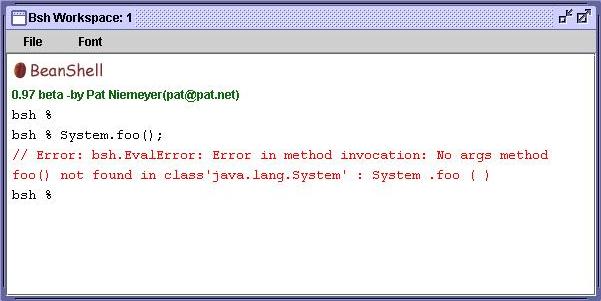
 The BeanShell Desktop is a simple GUI environment that provides multiple
bsh shell windows (MDI), a simple text editor, and a simple class browser.
The desktop is mostly implemented by BeanShell scripts, launched by the
desktop() command.
The BeanShell Desktop is a simple GUI environment that provides multiple
bsh shell windows (MDI), a simple text editor, and a simple class browser.
The desktop is mostly implemented by BeanShell scripts, launched by the
desktop() command.
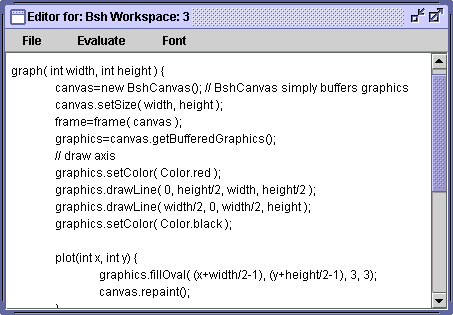
 The bsh console windows provide simple command line editing, history,
cut & paste, and variable and class name completion.
The bsh console windows provide simple command line editing, history,
cut & paste, and variable and class name completion.
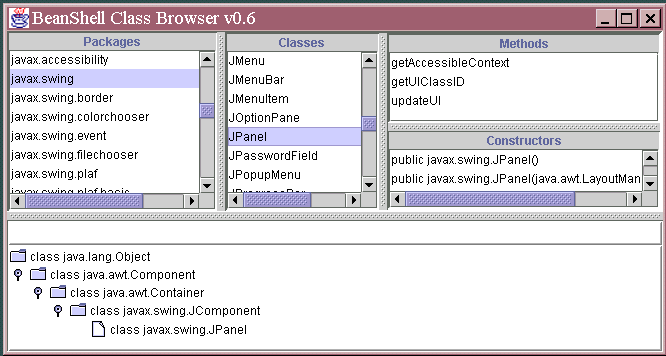
/**
    This is a javadoc style comment.
    <pre>
        <b>Here is some HTML markup.</b>
        <p/>
        Here is some more.
    </pre>

    @author Pat Niemeyer
*/
|
java bsh.Interpreter bshdoc.bsh myfile.bsh [ myfile2.bsh ] [ ... ] > output.xml |
<!-- This file was auto-generated by the bshdoc.bsh script -->
<BshDoc>
<File>
<Name>foo</Name>
<Method>
<Name>doFoo</Name>
<Sig>doFoo ( int x )</Sig>
<Comment>
<Text><![CDATA[ doFoo() method comment. ]]></Text>
<Tags>
</Tags>
</Comment>
</Method>
<Comment>
<Text><![CDATA[ foo file comment. ]]></Text>
<Tags>
</Tags>
</Comment>
</File>
</BshDoc> |
/**
    BshDoc for the foo() command.
    Explicitly supply the signature to be displayed for the foo() method.

    @method foo( int | Integer ) and other text...
*/
foo( arg ) { ... }
|
| Tip: BshDoc uses the bsh.Parser API to parse the BeanShell script files without actually running them. bshdoc.bsh is not very complex. Take a look at it to learn how to use the parser API. |
java bsh.Parser [ -p ] file [ file ] [ ... ] |
// From Java
import bsh.Interpreter;
i=new Interpreter();

// Declare method or source from file
i.eval("foo( args ) { ... }");

i.eval("foo(args)"); // repeatedly invoke the method
i.eval("foo(args)");
...
|
in=new FileReader("somefile.bsh");
Parser parser = new Parser(in);
while( !(eof=parser.Line()) ) {
    SimpleNode node = parser.popNode();
    // Use the node, etc. (See the bsh.BSH* classes)
    ...
}
|
| Tip: The BshDoc bshdoc.bsh script uses the parser to extract method signatures and comments from a BeanShell file. Check it out for a more realistic example. |
The bsh.util.JConsole is a light weight graphical shell console window,
with simple command editing and history capabilities. BeanShell uses
the JConsole for the GUI desktop mode again in the JRemoteApplet
for the remote server mode.
You can use the JConsole to provide an interactive BeanShell prompt in
your own applications.
You are free to use the JConsole for your own purposes outside of BeanShell
as well! It is a fairly generic shell window easily attached to any kind of
streams or through the simple console interface.
JConsole is a Swing component. Embed it in your application as you would
any other swing component. For example:
JConsole console = new JConsole(); myPanel.add(console); |
Interpreter interpreter = new Interpreter( console ); new Thread( interpreter ).start(); // start a thread to call the run() method |
| Tip: When interacting with any Swing component from outside the Java event handling thread, use the Swing thread safety facilities: SwingUtilities.invokeNow() and invokeLater(). |
| Reader getIn(); |
| PrintStream getOut(); |
| PrintStream getErr(); |
| void println( String s ); |
| void print( String s ); |
| void error( String s ); |
eval("a=5;");
print( a ); // 5
|
// Declare methods foo() and bar( int, String )
foo() { ... }
bar( int arg1, String arg2 ) { ... }

// Invoke a no-args method foo() by its name using eval()
name="foo";
// invoke foo() using eval()
eval( name+"()");

// Invoke two arg method bar(arg1,arg2) by name using eval()
name="bar";
arg1=5;
arg2="stringy";
eval( name+"(arg1,arg2)");
|
// Print the methods defined in this namespace print( this.methods ); |
this.invokeMethod( "bar", new Object [] { new Integer(5), "stringy" } );
|
foo() { ... }
foo( int a ) { ... }
bar( int arg1, String arg2 ) { ... }

print ( this.namespace.getMethods() );

// Array: [Lbsh.BshMethod;@291aff {
//   Bsh Method: bar
//   Bsh Method: foo
//   Bsh Method: foo
// }
|
name="bar";
signature = new Class [] { Integer.TYPE, String.class };

// Look up a method named bar with arg types int and String
bshMethod = this.namespace.getMethod( name, signature );

print("Found method: "+bshMethod);
|
| Tip: The Java reflection API uses special class values to represent primitive types such as int, char, an boolean. These types are static fields in the respective primitive wrapper classes. e.g. Integer.TYPE, Character.TYPE, Boolean.TYPE. |
name = bshMethod.getName(); Class [] types = bshMethod.getArgumentTypes(); Class returnType = bshMethod.getReturnType(); |
// invoke the method with arg
bshMethod.invoke( new Object [] { new Integer(1), "blah!" },
    this.interpreter, this.callstack );
|
#!/usr/java/bin/java bsh.Interpreter

print("foo");
|
#!/bin/sh
# The following hack allows java to reside anywhere in the PATH.
//bin/true; exec java bsh.Interpreter "$0" "$@"

print("foo");
|
#!/Library/Java/home/bin/java bsh.Interpreter

print("foo");
|
import com.ibm.bsf.*;

// register beanshell with the BSF framework
String [] extensions = { "bsh" };
BSFManager.registerScriptingEngine(
    "beanshell", "bsh.util.BeanShellBSFEngine", extensions );
|
<project name="testbsh" default="runscript" basedir=".">
<target name="runscript">
<!-- Run script from a file -->
<script language="beanshell" src="myscript.bsh"/>
<!-- Run script in-line -->
<script language="beanshell"><![CDATA[
for(int i=0; i<10; i++ )
print( "i="+i );
]]></script>
</target>
</project>
|
 If you like BeanShell check out my book:
Learning Java, O'Reilly & Associates, 2nd edition.
If you like BeanShell check out my book:
Learning Java, O'Reilly & Associates, 2nd edition.
| addClassPath | void addClassPath( string | URL )
|
| bg | Thread bg( String filename )
|
| bind | bind ( bsh .This ths , bsh .NameSpace namespace ) |
| browseClass | void browseClass( String | Object | Class )
|
| cat | cat ( String filename ) cat ( URL url ) cat ( InputStream ins ) cat ( Reader reader ) |
| cd | void cd ( String pathname ) |
| classBrowser | classBrowser ( ) |
| clear | clear ( ) |
| cp | cp ( String fromFile , String toFile ) |
| debug | debug ( ) |
| desktop | void desktop()
|
| dirname | String dirname ( String pathname ) |
| editor | editor ( ) |
| error | void error ( item ) |
| eval | Object eval ( String expression ) |
| exec | exec ( String arg ) |
| exit | exit ( ) |
| extend | This extend( This object )
|
| frame | Frame | JFrame | JInternalFrame frame( Component component )
|
| getBshPrompt | String getBshPrompt ( ) |
| getClass | Class getClass ( String name ) |
| getClassPath | URL [ ] getClassPath ( ) |
| getResource | URL getResource ( String path ) |
| getSourceFileInfo | getSourceFileInfo ( ) |
| importCommands | void importCommands( resource path | package name )
|
| javap | void javap( String | Object | Class | ClassIdentifier )
|
| load | Object load ( String filename ) |
| makeWorkspace | makeWorkspace ( String name ) |
| mv | mv ( String fromFile , String toFile ) |
| object | This object()
|
| pathToFile | File pathToFile ( String filename ) |
| void print ( arg ) | |
| printBanner | printBanner ( ) |
| pwd | pwd ( ) |
| reloadClasses | void reloadClasses( [ package name ] )
|
| rm | boolean rm ( String pathname ) |
| run | run ( String filename , Object runArgument ) run ( String filename ) |
| save | void save ( Object obj , String filename ) |
| server | void server ( int port ) |
| setAccessibility | setAccessibility ( boolean b ) |
| setClassPath | void setClassPath( URL [] )
|
| setFont | Font setFont ( Component comp , int ptsize ) |
| setNameCompletion | void setNameCompletion ( boolean bool ) |
| setNameSpace | setNameSpace ( ns ) |
| setStrictJava | void setStrictJava ( boolean val ) |
| show | show ( ) |
| source | Object source ( String filename ) Object source ( URL url ) |
| sourceRelative | sourceRelative ( String file ) |
| super | This super( String scopename )
|
| unset | void unset ( String name ) |
| which | which( classIdentifier | string | class )
|
| workspaceEditor | workspaceEditor( bsh.Interpreter parent, String name )
|
| addClassPath void addClassPath( string | URL ) |
|
Add the specified directory or JAR file to the class path.
e.g.
    addClassPath( "/home/pat/java/classes" );
    addClassPath( "/home/pat/java/mystuff.jar" );
    addClassPath( new URL("http://myserver/~pat/somebeans.jar") );
|
| bg Thread bg( String filename ) |
|
Source a command in its own thread in the caller's namespace
This is like run() except that it runs the command in its own thread. Returns the Thread object control. |
| bind bind ( bsh .This ths , bsh .NameSpace namespace ) |
| Bind a bsh object into a particular namespace and interpreter |
| browseClass void browseClass( String | Object | Class ) |
|
Open the class browser to view the specified class.
If the argument is a string it is considered to be a class name.
If the argument is an object, the class of the object is used.
If the arg is a class, the class is used.
Note: To browse the String class you can't supply a String. You'd have to do: browseClass( String.class );
|
| cat cat ( String filename ) cat ( URL url ) cat ( InputStream ins ) cat ( Reader reader ) |
| Print the contents of filename, url, or stream (like Unix cat) |
| cd void cd ( String pathname ) |
| Change working directory for dir(), etc. commands (like Unix cd) |
| classBrowser classBrowser ( ) |
| Open the class browser. |
| clear clear ( ) |
| Clear all variables, methods, and imports from this namespace. If this namespace is the root, it will be reset to the default imports. See NameSpace.clear(); |
| cp cp ( String fromFile , String toFile ) |
| Copy a file (like Unix cp). |
| debug debug ( ) |
| Toggle on and off debug mode. Debug output is verbose and generally useful only for developers. |
| desktop void desktop() |
| Start the BeanShell GUI desktop. |
| dirname String dirname ( String pathname ) |
|
Return directory portion of path based on the system default file separator.
Note: you should probably use pathToFile() to localize the path relative
to BeanShell's working directory and then file.getAbsolutePath() to get
back to a system localized string.
Example: to change to the directory that contains the script we're currently executing: // Change to the directory containing this script path=pathToFile( getSourceFileInfo() ).getAbsolutePath(); cd( dirname( path ) ); |
| editor editor ( ) |
| Open a GUI editor from the command line or in the GUI desktop mode. When run from the command line the editor is a simple standalone frame. When run inside the GUI desktop it is a workspace editor. See workspaceEditor() |
| error void error ( item ) |
| Print the item as an error. In the GUI console the text will show up in (something like) red, else it will be printed to standard error. |
| eval Object eval ( String expression ) |
|
Evaluate the string in the current interpreter (see source()).
Returns the result of the evaluation or null.
Evaluate a string as if it were written directly in the current scope, with side effects in the current scope.
e.g.
eval() acts just like invoked text except that any exceptions generated by the code are captured in a bsh.EvalError. This includes ParseException for syntactic errors and TargetError for exceptions thrown by the evaluated code. e.g.
    try {
        eval("foo>>><>M>JK$LJLK$");
    } catch ( EvalError e ) {
        // ParseException caught here
    }

    try {
        eval("(Integer)true");  // illegal cast
    } catch ( EvalError e ) {
        // TargetException caught here
        print( e.getTarget() )  // prints ClassCastException
    }
If you want eval() to throw target exceptions directly, without wrapping them, you can simply redefine own eval like so:
    myEval( String expression ) {
        try {
            return eval( expression );
        } catch ( TargetError e ) {
            throw e.getTarget();
        }
    }
Here is a cute example of how to use eval to implement a dynamic cast.
i.e. to cast a script to an arbitrary type by name at run-time where the
type is not known when you are writing the script. In this case the type
is in the variable interfaceType.
reference = eval( "("+interfaceType+")this" );
Returns the value of the expression. Throws bsh.EvalError on error
|
| exec exec ( String arg ) |
| Start an external application using the Java Runtime exec() method. Display any output to the standard BeanShell output using print(). |
| exit exit ( ) |
| Conditionally exit the virtual machine. Call System.exit(0) unless bsh.system.shutdownOnExit == false. |
| extend This extend( This object ) |
|
Return a new object that is a child of the specified object.
Note: this command will likely change along with a better inheritance
mechanism for bsh in a future release.
extend() is like the object() command, which creates a new bsh scripted object, except that the namespace of the new object is a child of the parent object. For example:
    foo=object();
    bar=extend(foo);

    is equivalent to:

    foo() {
        bar() {
            return this;
        }
    }

    foo=foo();
    bar=foo.bar();

    and also:

    oo=object();
    ar=object();
    ar.namespace.bind( foo.namespace );
The last example above is exactly what the extend() command does. In each case the bar object inherits variables from foo in the usual way. |
| frame Frame | JFrame | JInternalFrame frame( Component component ) |
|
Show component in a frame, centered and packed, handling disposal with
the close button.
Display the component, centered and packed, in a Frame, JFrame, or JInternalFrame. Returns the frame. If the GUI desktop is running then a JInternaFrame will be used and automatically added to the desktop. Otherwise if Swing is available a top level JFrame will be created. Otherwise a plain AWT Frame will be created. |
| getBshPrompt String getBshPrompt ( ) |
Get the value to display for the bsh interactive prompt.
This command checks for the variable bsh.prompt and uses it if set.
else returns "bsh % "
Remember that you can override bsh commands simply by defining the method
in your namespace. e.g. the following method displays the current working
directory in your prompt:
	String getBshPrompt() {
		return bsh.cwd + " % ";
	}
|
| getClass Class getClass ( String name ) |
|
Get a class through the current namespace utilizing the current imports,
extended classloader, etc.
This is equivalent to the standard Class.forName() method for class loading, however it takes advantage of the BeanShell class manager so that added classpath will be taken into account. You can also use Class.forName(), however if you have modified the classpath or reloaded classes from within your script the modifications will only appear if you use the getClass() command. |
| getClassPath URL [ ] getClassPath ( ) |
| Get the current classpath including all user path, extended path, and the bootstrap JAR file if possible. |
| getResource URL getResource ( String path ) |
| Get a resource from the BeanShell classpath. This method takes into account modification to the BeanShell class path via addClassPath() and setClassPath(); |
| getSourceFileInfo getSourceFileInfo ( ) |
|
Return the name of the file or source from which the current interpreter
is reading. Note that if you use this within a method, the result will
not be the file from which the method was sourced, but will be the file
that the caller of the method is reading. Methods are sourced once but
can be called many times... Each time the interpreter may be associated
with a different file and it is that calling interpreter that you are
asking for information.
Note: although it may seems like this command would always return the getSourceFileInfo.bsh file, it does not since it is being executed after sourcing by the caller's interpreter. If one wanted to know the file from which a bsh method was sourced one would have to either capture that info when the file was sourced (by saving the state of the getSourceFileInfo() in a variable outside of the method or more generally we could add the info to the BshMethod class so that bsh methods remember from what source they were created... |
| importCommands void importCommands( resource path | package name ) |
Import scripted or compiled BeanShell commands in the following package
in the classpath. You may use either "/" path or "." package notation.
e.g.
// equivalent
importCommands("/bsh/commands")
importCommands("bsh.commands")
|
| javap void javap( String | Object | Class | ClassIdentifier ) |
Print the public fields and methods of the specified class (output similar
to the JDK javap command).
If the argument is a string it is considered to be a class name. If the
argument is an object, the class of the object is used. If the arg is a
class, the class is used. If the argument is a class identifier, the class
identified by the class identifier will be used. e.g. If the argument is
the empty string an error will be printed.
// equivalent javap( java.util.Date ); // class identifier javap( java.util.Date.class ); // class javap( "java.util.Date" ); // String name of class javap( new java.util.Date() ); // instance of class |
| load Object load ( String filename ) |
| Load a serialized Java object from filename. Returns the object. |
| makeWorkspace makeWorkspace ( String name ) |
| Open a new workspace (JConsole) in the GUI desktop. |
| mv mv ( String fromFile , String toFile ) |
| Rename a file (like Unix mv). |
| object This object() |
|
Return an "empty" BeanShell object context which can be used to hold
data items. e.g.
    myStuff = object();
    myStuff.foo = 42;
    myStuff.bar = "blah";
|
| pathToFile File pathToFile ( String filename ) |
| Create a File object corresponding to the specified file path name, taking into account the bsh current working directory (bsh.cwd) |
| print void print ( arg ) |
|
Print the string value of the argument, which may be of any type.
If beanshell is running interactively, the output will always go to the
command line, otherwise it will go to System.out.
Most often the printed value of an object will simply be the Java toString() of the object. However if the argument is an array the contents of the array will be (recursively) listed in a verbose way. Note that you are always free to use System.out.println() instead of print(). |
| printBanner printBanner ( ) |
| Print the BeanShell banner (version and author line) - GUI or non GUI. |
| pwd pwd ( ) |
| Print the BeanShell working directory. This is the cwd obeyed by all the unix-like bsh commands. |
| reloadClasses void reloadClasses( [ package name ] ) |
|
Reload the specified class, package name, or all classes if no name is
given. e.g.
    reloadClasses();
    reloadClasses("mypackage.*");
    reloadClasses(".*")  // reload unpackaged classes
    reloadClasses("mypackage.MyClass")
See "Class Path Management" |
| rm boolean rm ( String pathname ) |
| Remove a file (like Unix rm). |
| run run ( String filename , Object runArgument ) run ( String filename ) |
|
Run a command in its own in its own private global namespace, with its
own class manager and interpeter context. (kind of like unix "chroot" for
a namespace).
The root bsh system object is extended (with the extend() command) and
made visible here, so that general system info (e.g. current working
directory) is effectively inherited. Because the root bsh object is
extended it is effectively read only / copy on write...
e.g. you can change directories in the child context, do imports, change
the classpath, etc. and it will not affect the calling context.
run() is like source() except that it runs the command in a new, subordinate and prune()'d namespace. So it's like "running" a command instead of "sourcing" it. run() teturns the object context in which the command was run. Returns the object context so that you can gather results. Parameter runArgument an argument passed to the child context under the name runArgument. e.g. you might pass in the calling This context from which to draw variables, etc.
|
| save void save ( Object obj , String filename ) |
| Save a serializable Java object to filename. |
| server void server ( int port ) |
| Create a remote BeanShell listener service attached to the current interpreter, listening on the specified port. |
| setAccessibility setAccessibility ( boolean b ) |
| Setting accessibility on enables to private and other non-public fields and method. |
| setClassPath void setClassPath( URL [] ) |
|
Change the classpath to the specified array of directories and/or archives.
See "Class Path Management" for details. |
| setFont Font setFont ( Component comp , int ptsize ) |
| Change the point size of the font on the specified component, to ptsize. This is just a convenience for playing with GUI components. |
| setNameCompletion void setNameCompletion ( boolean bool ) |
|
Allow users to turn off name completion.
Turn name completion in the GUI console on or off. Name competion is on by default. Explicitly setting it to true however can be used to prompt bsh to read the classpath and provide immediate feedback. (Otherwise this may happen behind the scenes the first time name completion is attempted). Setting it to false will disable name completion. |
| setNameSpace setNameSpace ( ns ) |
Set the namespace (context) of the current scope.
The following example illustrates swapping the current namespace.
    fooState = object();
    barState = object();

    print(this.namespace);
    setNameSpace(fooState.namespace);
    print(this.namespace);
    a=5;
    setNameSpace(barState.namespace);
    print(this.namespace);
    a=6;

    setNameSpace(fooState.namespace);
    print(this.namespace);
    print(a);  // 5

    setNameSpace(barState.namespace);
    print(this.namespace);
    print(a); // 6
You could use this to creates the effect of a static namespace for a
method by explicitly setting the namespace upon entry.
|
| setStrictJava void setStrictJava ( boolean val ) |
|
Enable or disable "Strict Java Mode".
When strict Java mode is enabled BeanShell will:
|
| show show ( ) |
| Toggle on or off displaying the results of expressions (off by default). When show mode is on bsh will print() the value returned by each expression you type on the command line. |
| source Object source ( String filename ) Object source ( URL url ) |
| Read filename into the interpreter and evaluate it in the current namespace. Like the Bourne Shell "." command. This command acts exactly like the eval() command but reads from a file or URL source. |
| sourceRelative sourceRelative ( String file ) |
| Source a file relative to the callering script's directory. e.g. scripts A running in dir A sources script B in dir B. Script B can use this command to load additional scripts (data, etc.) relative to its own location (dir B) without having to explicitly know its "home" directory (B). Note: this only works for files currently. |
| super This super( String scopename ) |
|
Return a BeanShell 'this' reference to the enclosing scope
(method scope) of the specified name.
e.g.
    foo() {
        x=1;
        bar() {
            x=2;
            gee() {
                x=3;
                print( x ); // 3
                print( super.x ); // 2
                print( super("foo").x ); // 1
            }
        }
    }
This is an experimental command that is not intended to be of general use.
|
| unset void unset ( String name ) |
|
"Undefine" the variable specifed by 'name' (So that it tests == void).
Note: there will be a better way to do this in the future. This is currently equivalent to doing namespace.setVariable(name, null); |
| which which( classIdentifier | string | class ) |
Use classpath mapping to determine the source of the specified class
file. (Like the Unix which command for executables).
This command maps the entire classpath and prints all of the occurrences
of the class. If you just want to find the first occurrence in the
classpath (the one that will be used by Java) you can also get it by
printing the URL of the resource. e.g.:
        print( getResource("/com/foo/MyClass.class") );
		// Same as...
        // System.out.println(
        //    getClass().getResourceAsStream("/com/foo/MyClass.class" ) );
Note: This is all a lie! This command is broken and only reports the
currently first occurence! To be fixed!
|
| workspaceEditor workspaceEditor( bsh.Interpreter parent, String name ) |
| Make a new workspaceEditor in the GUI. |